Automation Projects
Automation isn’t just about the code — it’s about impact, clarity, and real use-cases.
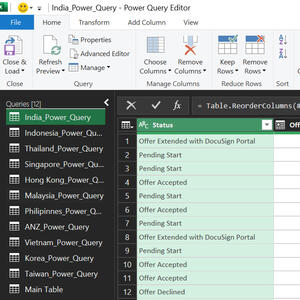
Automated Onboarding Tracker Using Power Query & Excel
Executive Summary
Context: Onboarding Automation
Role: Recruitment Operations
Tools Used: Power Query, Advanced Excel, Data Modeling
Impact: Reduced manual tracking effort by 10 hours/week, improved onboarding visibility across 13 APAC countries
Business Problem Statement
* Onboarding status was tracked manually across multiple Excel files.
* Inconsistent tracker updated.
* Manual consolidation required frequent copy-pasting.
* Leadership lacked real-time onboarding visibility.
* Error rate due to duplicate entries and mismatched data.
* Time consumption.
Solution Architecture
Data Sources
* Offer release tracker (Pulled via ATS - Avature)
* Candidate onboarding sheet stored in XLS.Power Query Logic Applied
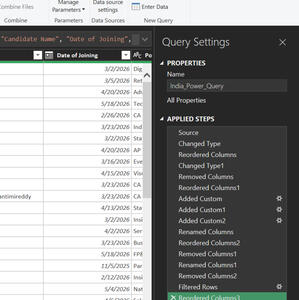
* Cleaned inconsistent headers.
* Created calculated columns.
* Built conditional logic for onboarding status.
* Created refreshable Power Query with one-click update.
Data Sources → Power Query Cleaning → Data Merge → Status Logic → Output
Measurable Impact
* Reduced manual consolidation time from 10 hours/week.
* Enabled visibility across 13 APAC countries.
* Clarity on Offer vs Joined candidates.
* Pending Start tracker become easier.
* Ease the further automation.
* Reduced duplicate record errors by 100%.
Automated Leave Approval & Calendar Management Using MS Forms, Power Automate & Excel
Executive Summary
Context: Leave Request & Approval Automation
Role: Recruitment Operations / Talent Analytics
Tools Used: Microsoft Forms, Power Automate (Cloud Flow), Microsoft Teams, Excel, Outlook
Impact: Automated end-to-end leave approval workflow, improving transparency, reducing manual tracking efforts, and ensuring accurate leave calendar management.
Business Problem Statement
Leave requests were managed through manual communication and spreadsheet updates.* Employees informed managers through emails or Teams messages.
* Leave approvals lacked a standardized tracking mechanism.
* Manual updates were required in the leave calendar Excel tracker.
* Risk of missed approvals, inaccurate records, and communication gaps.
* No centralized workflow for leave request management.
* Time-consuming administrative effort for managers and coordinators.
Solution Architecture
Data Source
* Microsoft Forms used as a centralized leave request portal.
* Employees submit leave details including dates, leave type, reason, and duration.
* Responses automatically stored for processing.
Power Query Logic Applied* Triggered automatically when a new leave request is submitted.
* Captured employee leave details from Microsoft Forms.
* Generated an approval request using Teams Approvals.
* Routed requests directly to the reporting manager.
* Processed approval or rejection decisions automatically.
* Updated leave records in Excel upon approval.
* Sent automated email notifications to employees with approval status.
* Triggered automated Teams meeting creation for Out-of-Office (OOO) planning and visibility.
Teams & Approval Integration
8 Integrated Microsoft Teams Approval workflow.
* Real-time approval notifications sent to managers.
* Automated approval history maintained for auditability.
* Teams meeting scheduled automatically after approval.
* Ensured visibility of upcoming employee absences across the team.Microsoft Forms → Power Automate Trigger → Teams Approval → Manager Decision → Excel Update → Email Notification → Teams OOO Meeting Creation
Measurable Impact
* Eliminated manual leave request tracking and follow-ups.
* Reduced leave processing time from hours to a few minutes.
* Automated leave calendar updates with zero manual intervention.
* Improved transparency and visibility of leave approvals.
* Created a centralized and auditable leave management process.
* Minimized risks of missed leave records and communication gaps.
* Enhanced employee and manager experience through self-service automation.
* Established a scalable framework for future HR process automations.

Automated Internal Job Posting Using Power Query & Excel
Executive Summary
Context: Automated Internal Job Posting
Role: Recruitment Operations / Talent Analytics
Tools Used: Power Query, Advanced Excel, Power Automate (Cloud Flow), Outlook
Impact: Fully automated IJP distribution process across APAC, eliminating manual email effort and ensuring standardized communication
Business Problem Statement
Internal Job Postings (IJP) were distributed manually across APAC countries.* IJPs were shared through manual copy-paste emails.
* High dependency on manual formatting and country-wise distribution lists.
* Risk of missing stakeholders during circulation.
* No centralized or structured workflow.
* Time-consuming repetitive administrative efforts.
Solution Architecture
Data Source
* IJP master tracker maintained in Excel.
* Structured job details including role, location, hiring manager, eligibility, and application deadline.
Power Query Logic Applied* Standardized and cleaned job data format.
* Removed blank or incomplete entries.
* Created calculated columns for structured email-ready content.
* Built a refreshable query to prepare final IJP distribution dataset.
* Designed one-click refresh process for updated postings.
* Create cloud flow using power automate that sends email notification for all the APAC conuntires on a single click.
Power Automate Integration (Cloud Flow)
* Trigger: When refreshed dataset is updated.
* Extracted structured IJP details from the output file.
* Automated dynamic email body creation.
* Connected with Outlook connector.
* Distributed IJP emails to country-specific APAC distribution lists automatically.Data Source → Power Query Cleaning → Structured Output → Power Automate Trigger → Outlook Distribution → APAC Countries
Measurable Impact
* Eliminated 100% manual copy-paste effort in IJP circulation.
* Reduced distribution time from ~2–3 hours per posting to under 5 minutes.
* Standardized communication format across 13 APAC countries
* Minimized risk of missing stakeholders.
* Improved operational efficiency and governance.
* Created scalable framework for future automation enhancements.